
Real Views
v1.0.0 · XenForo 2.3+ · Updated
by D.C Style · Add-ons
Qualified thread-view analytics for XenForo, with guided Cloudflare setup, searchable traffic selectors and reviewed rule deployment.
- v1.0.0
- XenForo 2.3+
- Updated
- 129 KB
$39.00
one-time
Includes 12 months of updates. Renew for $29.00 if you want more — never automatic.
- Licence key and download right after payment
- Not working as described? See the refund policy
At checkout you can add 24 months of updates (+$21.75) or we install it (+$25.00).
Also in 1 bundle
The Full House
9 add-ons · save 27%
$159.00
Better together
Save 27%
Eight more add-ons for $120 more
8 more add-ons in The Full House.
$159.00
regular price $218.00
View bundle
Licence & help
- Use on one XenForo installation
- Updates and support for 12 months
- Optional renewal at $29.00 for another 12 months of updates & support. Never charged automatically.
- Keeps working after updates end
What your licence covers
1XenForo install
12 moof updates
12 moof support
Keeps working after updates end. Renew for $29.00 for another 12 months, never charged automatically.
You may also like
More in Add-onsYou May Also Like
-
 Smart Mail Router
Add-ons
$25.00
Smart Mail Router
Add-ons
$25.00
-
 Login As User
Add-ons
53 downloads
Free
Login As User
Add-ons
53 downloads
Free
-
 Forum Statistics
Add-ons
72 downloads
Free
Forum Statistics
Add-ons
72 downloads
Free
-
 Google Drive Attachments
Add-ons
$25.00
Google Drive Attachments
Add-ons
$25.00
Screenshots
14 images · tapclick to enlarge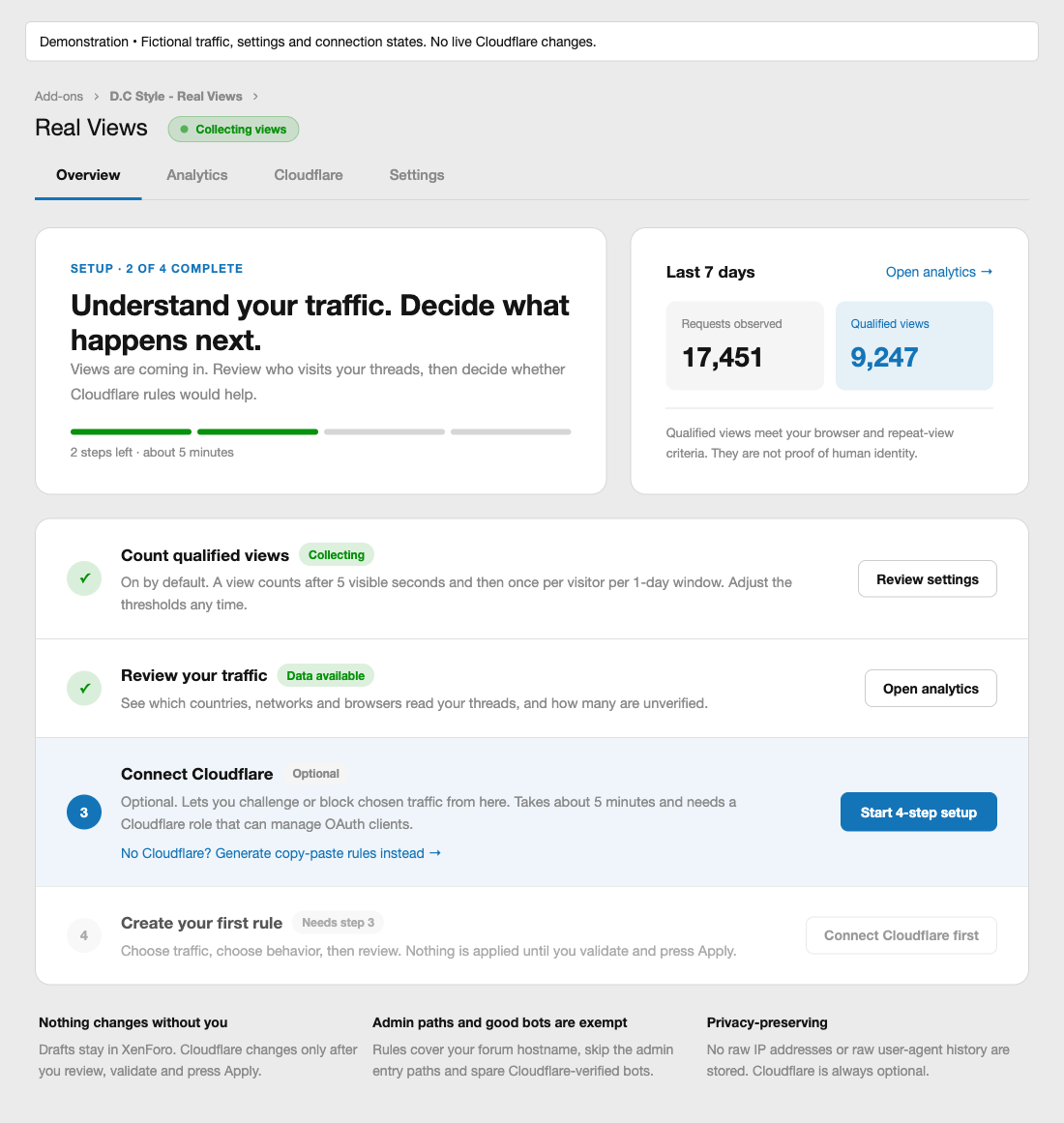

Description
Understand the views behind your thread counter. Real Views adds a separate qualified-view counter to XenForo, helping you compare visits that meet your counting rules with recognized bots, repeat visits and unverified requests.
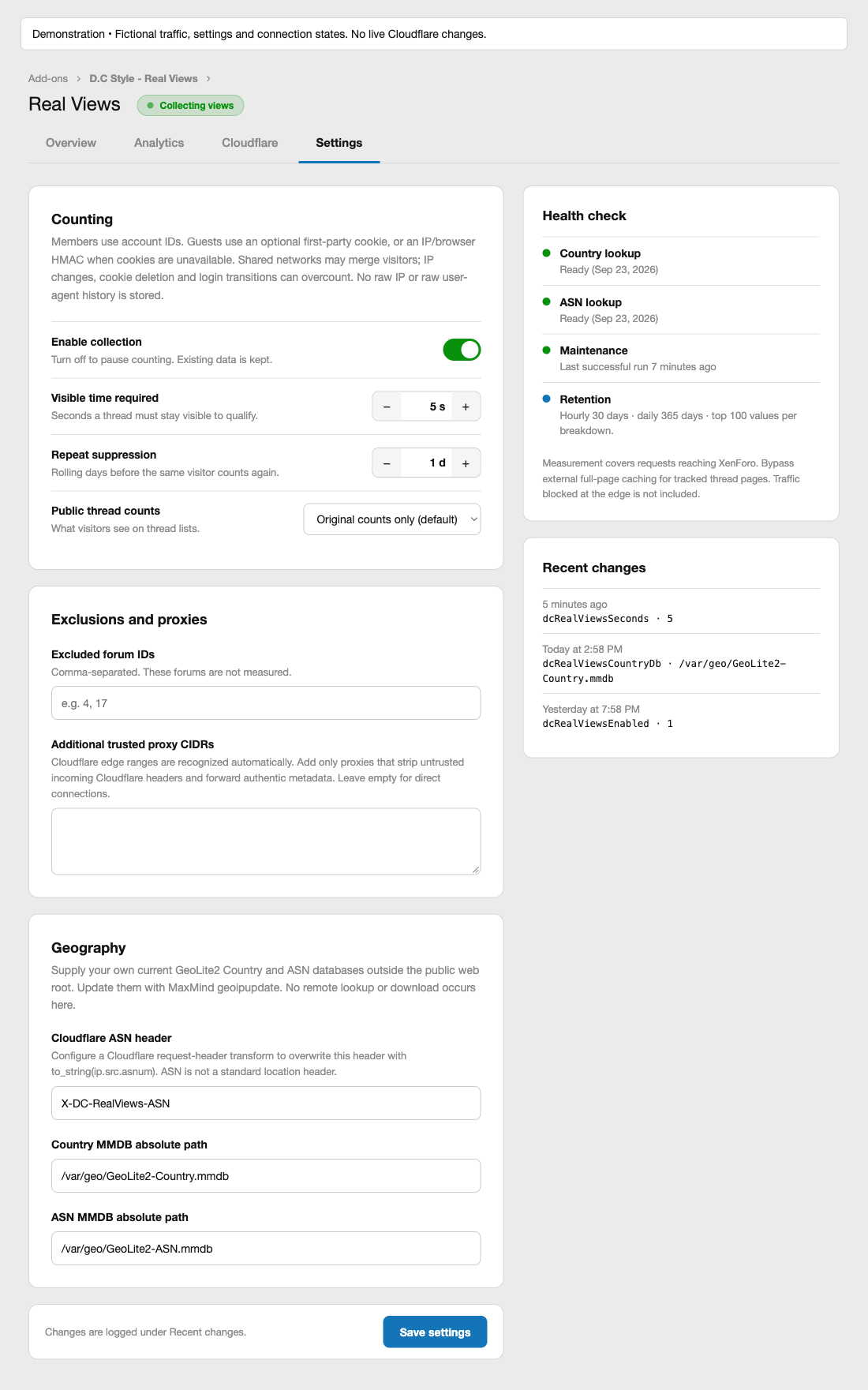
By default, a visit qualifies after the thread has been visible for five seconds, and the same member or browser can qualify once per thread in a rolling 24-hour window. Both settings are adjustable. Your existing XenForo view counts stay intact, so you can collect data privately before deciding whether to show original counts, qualified counts, or both to members.
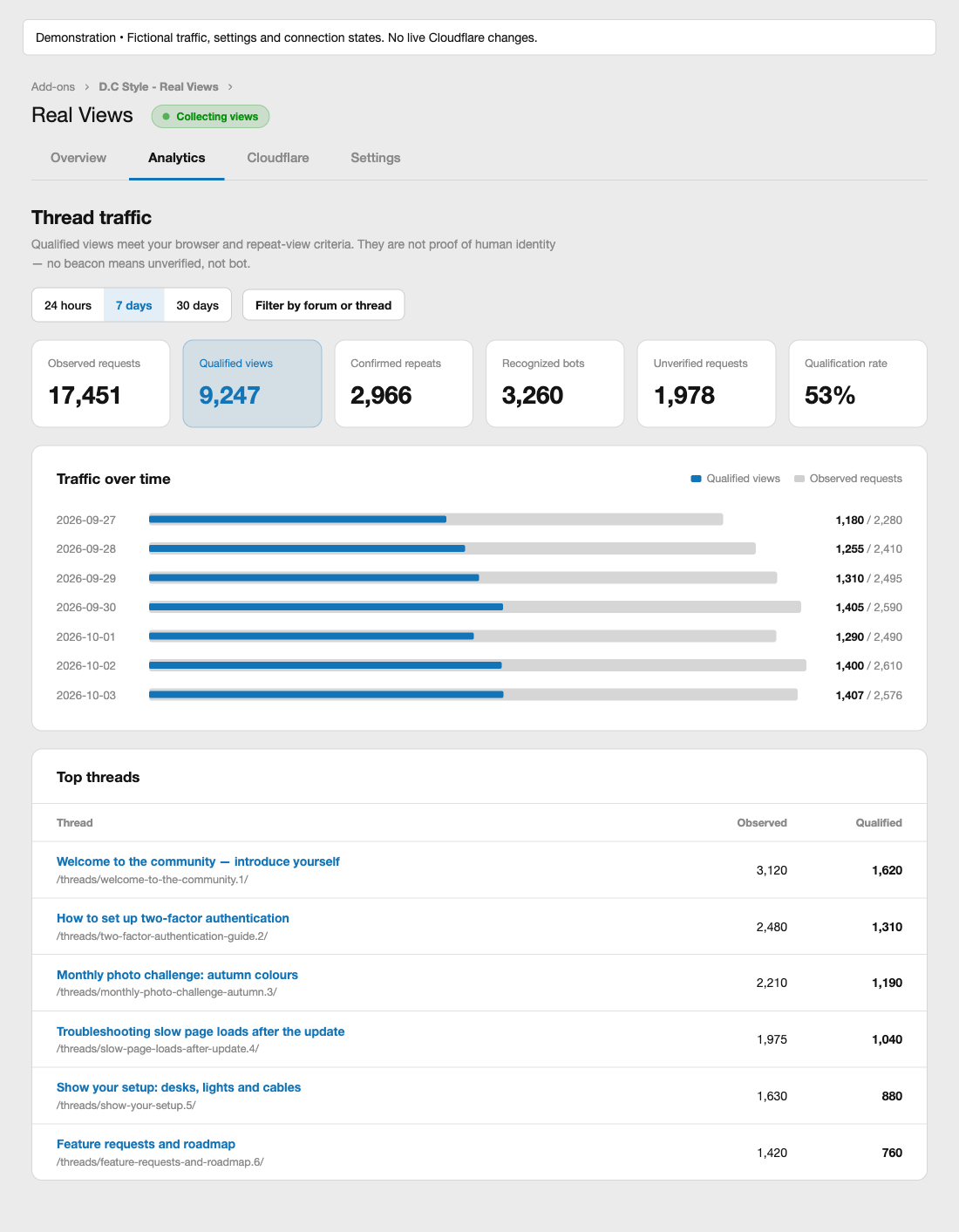
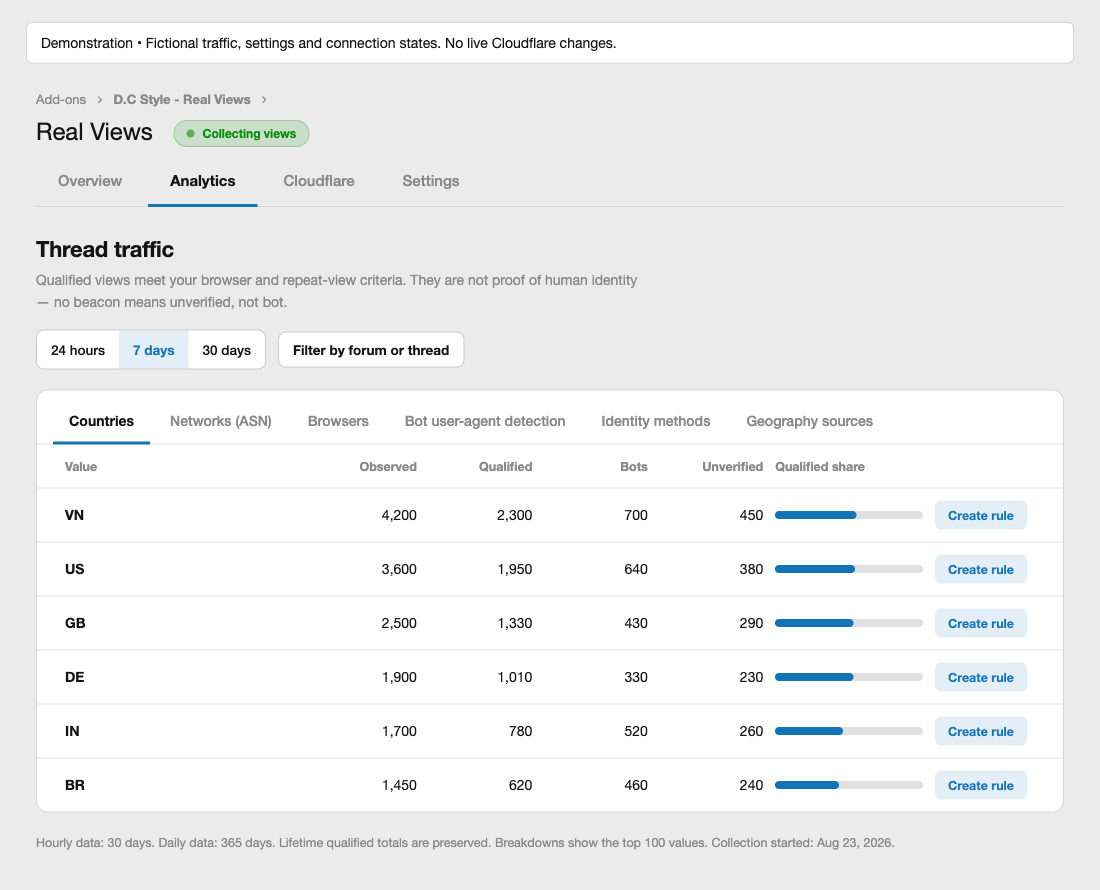
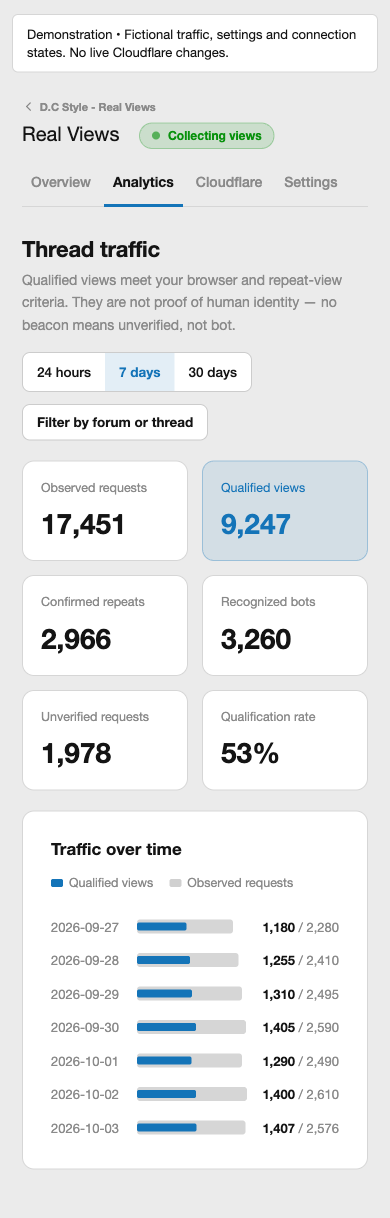
The Admin CP brings the results together in four tabs: Overview, Analytics, Cloudflare and Settings. Analytics shows observed requests, qualified views, confirmed repeats, recognized bots, unverified requests and the qualification rate. Switch between 24-hour, 7-day and 30-day views, filter by forum or thread or choose custom dates, and inspect country, network (ASN), browser, bot, identity-method and geography-source breakdowns. Geography can come from trusted Cloudflare headers or local GeoIP databases; the main analytics work without either.
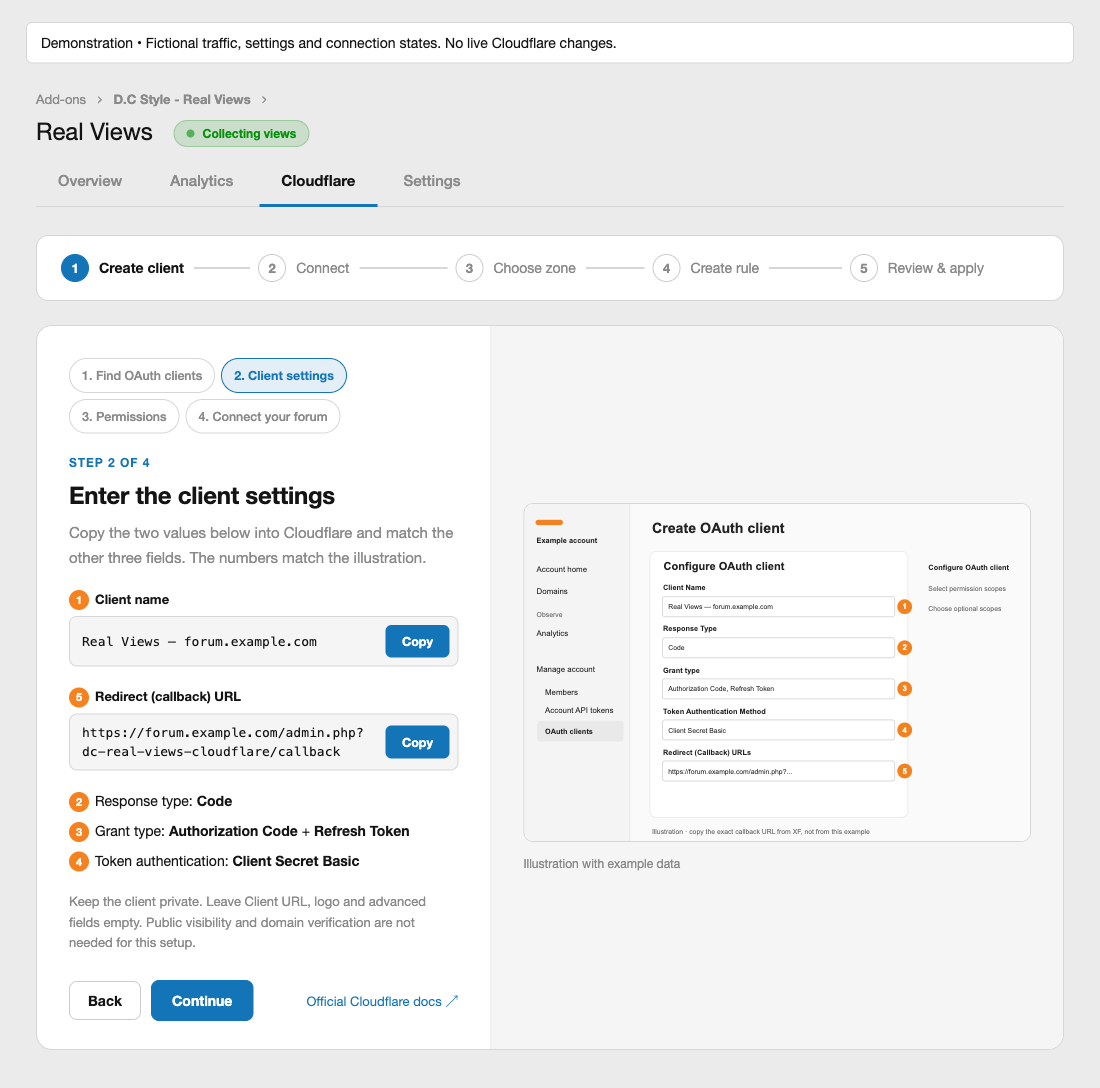
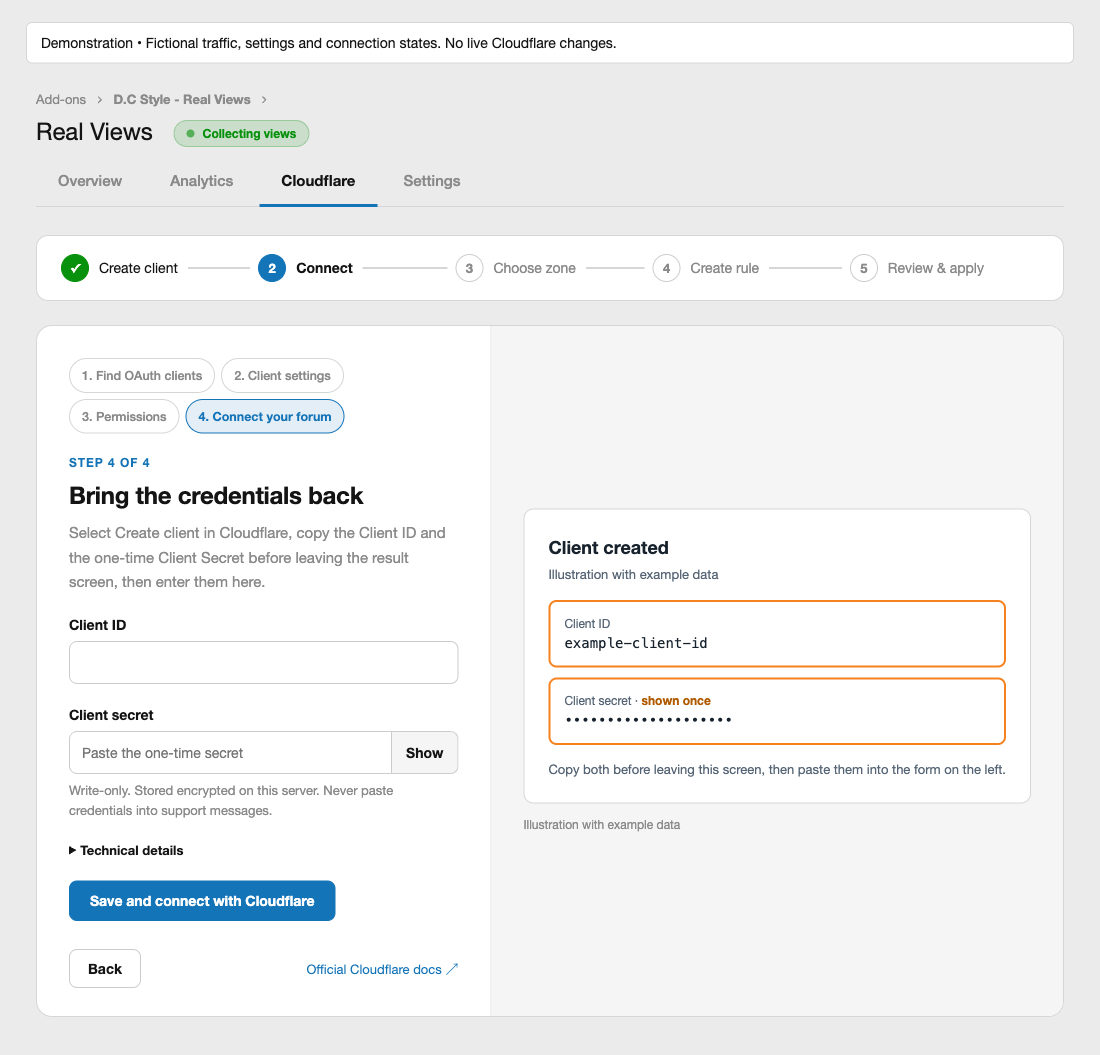
A guided path from traffic reports to Cloudflare rules. The Overview tab keeps a four-step setup checklist: count qualified views, review your traffic, connect Cloudflare (optional) and create your first rule. Follow the illustrated private-client setup guide, then enter your Cloudflare Client ID and Client Secret. Real Views supplies the required scope identifiers automatically. Authorize access and confirm the zone covering your forum. Connecting does not apply any rules.
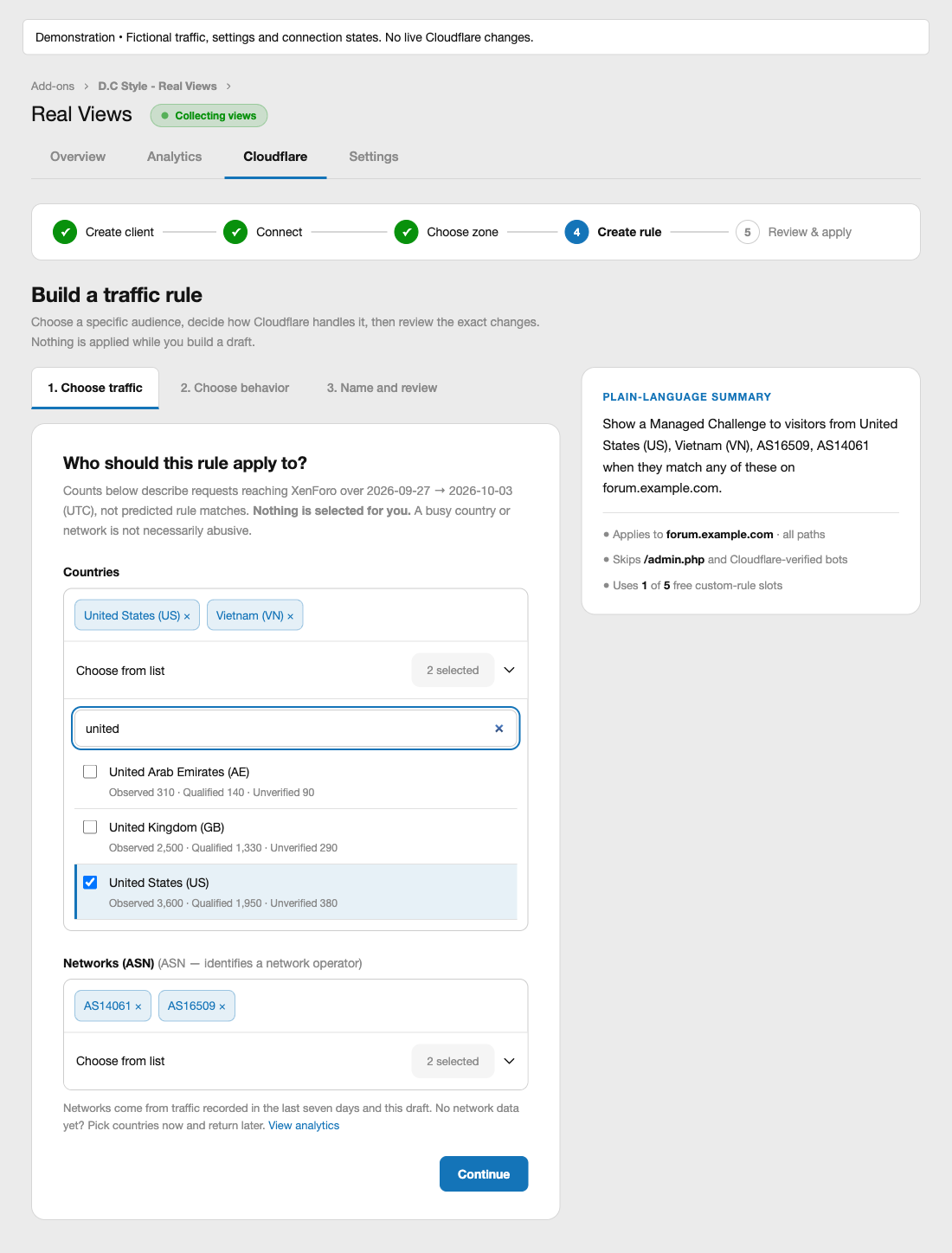
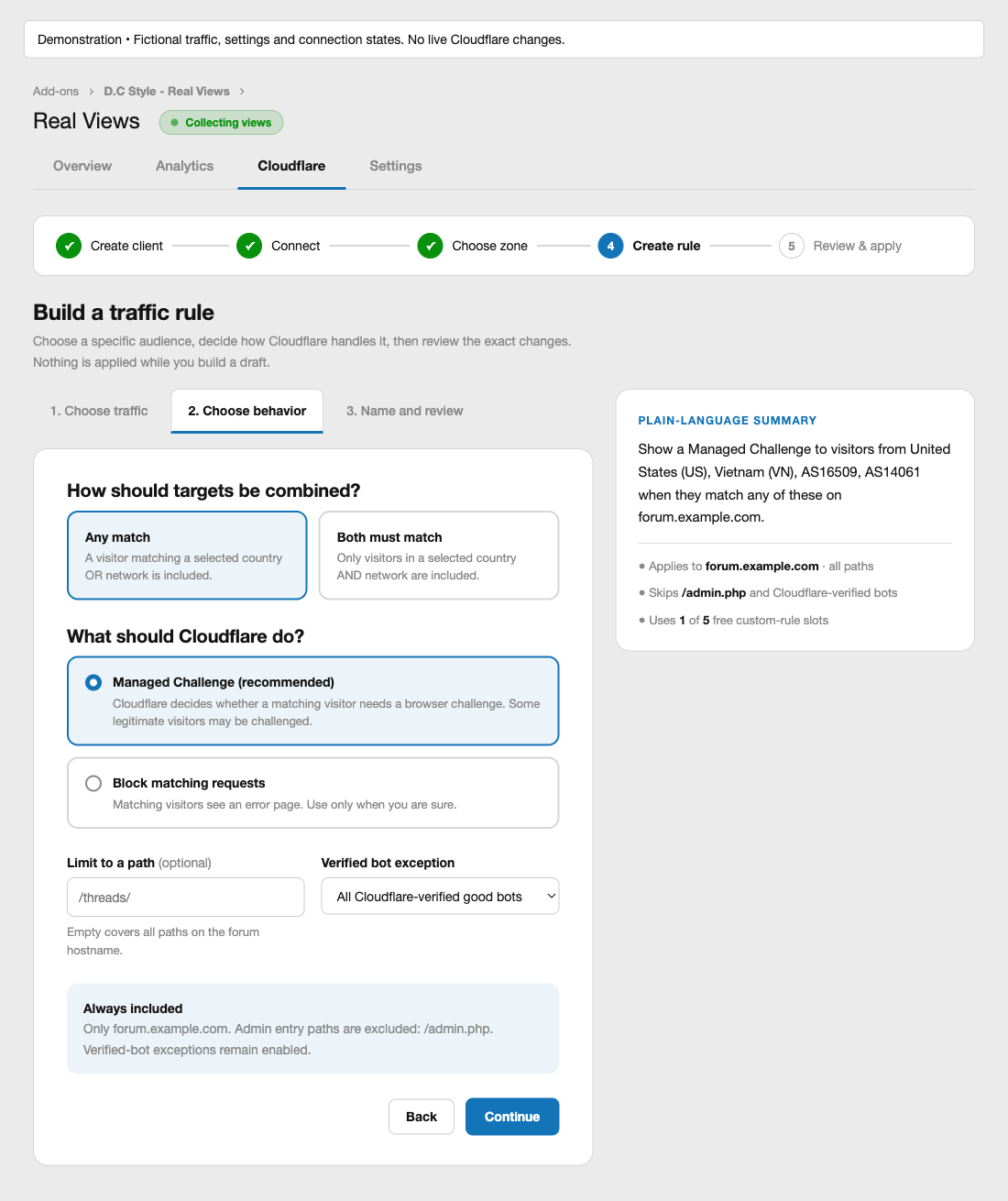
Create your first rule in three stages: choose traffic, choose its behavior, then name and review the rule group. Search countries by name or code and select networks from recent traffic or your saved draft. Selected values appear as removable chips, with observed, qualified and unverified counts beside recorded traffic. A plain-language summary updates as you choose. Nothing is selected automatically in a new draft; the Create rule shortcuts in Analytics pre-select only the value you clicked.
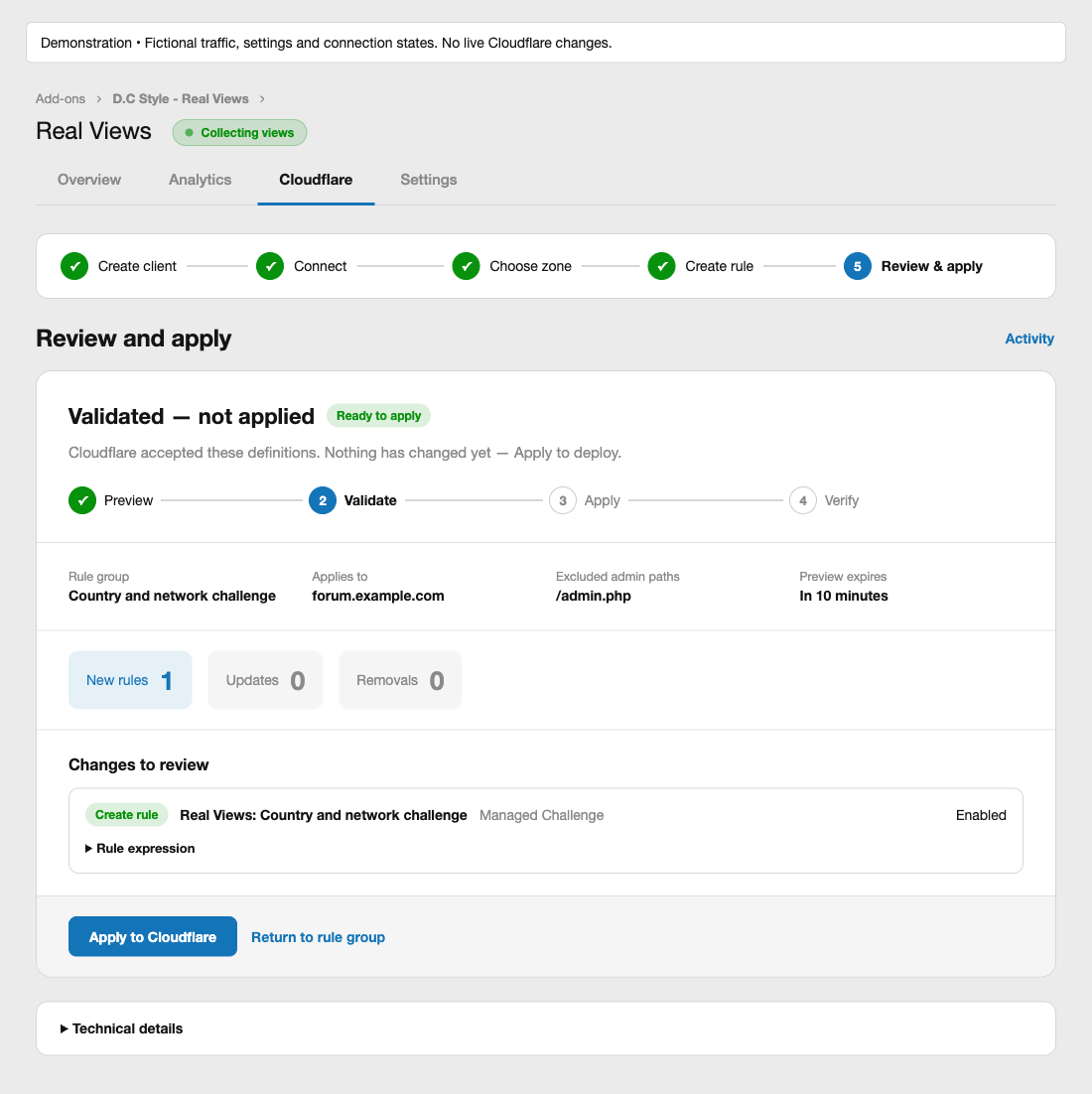
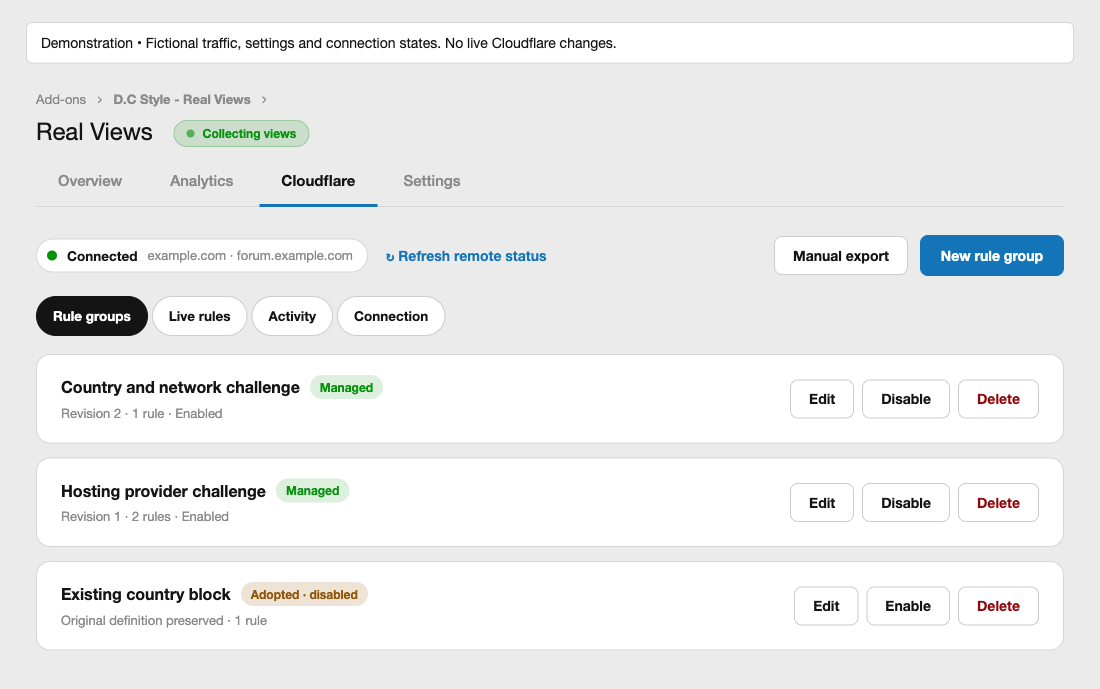
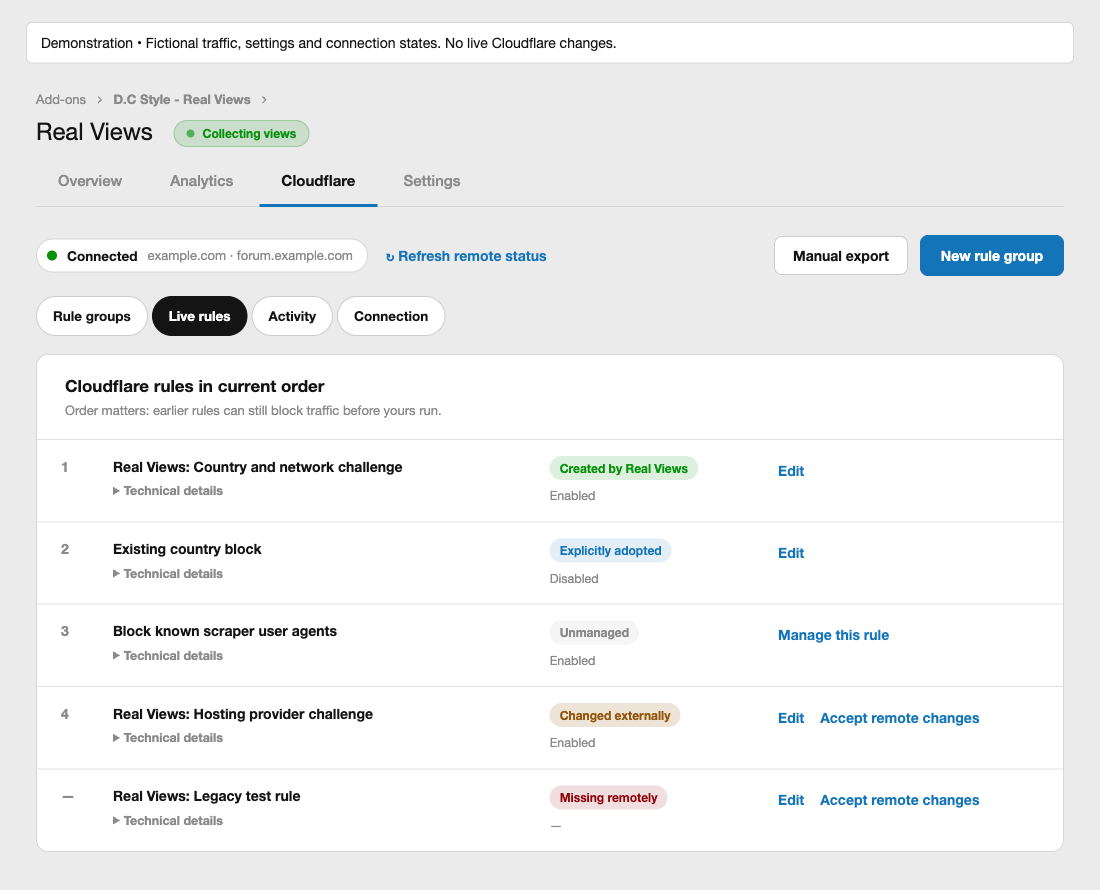
Choose Managed Challenge or Block, review the forum hostname, protected admin paths and verified-bot exception, then validate and explicitly apply the proposed changes. A timeline follows each step from preview to verification, and you can save a draft to finish later. After deployment, the Cloudflare tab’s Rule groups, Live rules, Activity and Connection views bring managed rule groups, the rules currently on Cloudflare, deployment history, connection health and recovery actions together. Existing supported rules can be explicitly adopted.
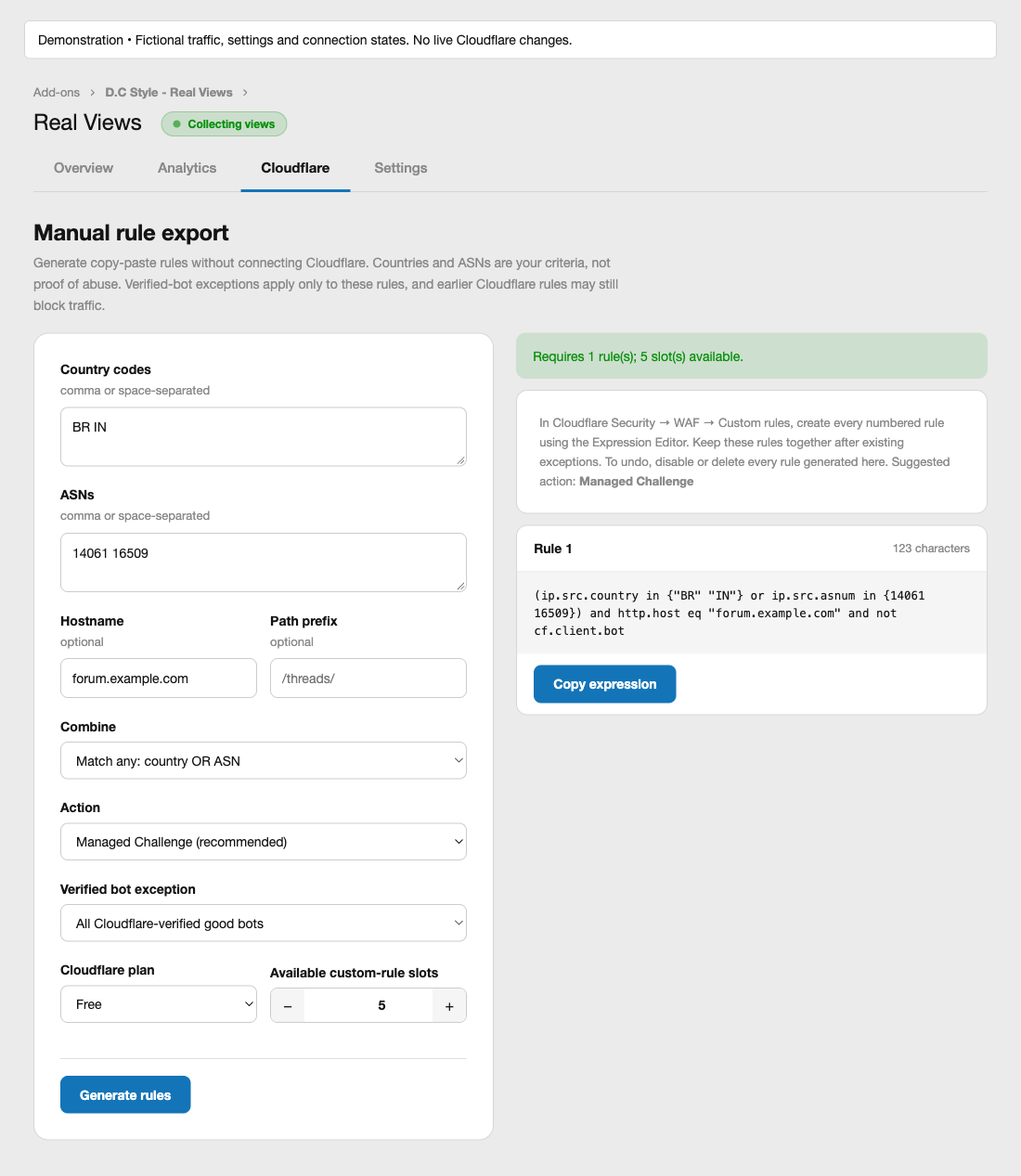
Prefer to copy the rules yourself? Manual export remains available without connecting Cloudflare. It generates complete expressions, splits long value sets, and shows expression lengths and required rule slots.
Real Views works on its own. If you also use Forum Statistics, an optional Most qualified views tab lets members discover threads using the new measurement.
What the numbers mean: a qualified view is evidence of browser activity meeting your rules, not proof of a human visitor. Missing JavaScript beacons remain unverified. Measurement starts after installation and covers requests that reach XenForo; it cannot reconstruct historical human traffic or count visits blocked at the edge.
Real Views guides
3- How to install Real Views for XenForo Install Real Views and give your administrators the right permissions, so you can open the Real Views Overview. Beginner 1 min · Installation Installation Beginner 1 min
- Real Views settings: visible time and repeat window Set how long a thread must be visible and how long repeat visits are suppressed, so you can tune Real Views qualified view counts. Intermediate 1 min · Configuration Configuration Intermediate 1 min
- How to read Real Views analytics in the Admin CP Read the Overview and Analytics tabs to compare qualified views with bots, repeats and unverified requests. Intermediate 1 min · Add-on Guides Add-on Guides Intermediate 1 min
Add at checkout
24 months of updates instead of 12
+$21.75
We install it for you
+$25.00
You can pick these in the cart.
Reviews
Sign in to write a reviewNo reviews yet. Only customers who bought it can review.
Questions 5
Answered by the D.C Style team.
Does Real Views replace my existing XenForo view counts?
No.
Real Views adds a separate qualified-view counter and leaves your existing XenForo view totals untouched. You collect the new data privately first, then decide whether to show the original counts, the qualified counts, or both to members.
Answered by D.C Style ·
Real Views is in your cart
$39.00 · New licence
Better together · save 27%
Real Views
 Captcha questions on Posting
 Story
+6
Eight more add-ons for $120 more, as The Full House.
Story
+6
Eight more add-ons for $120 more, as The Full House.
Real Views
Captcha questions on Posting
Story
+6
One by one $218.00
$159.00