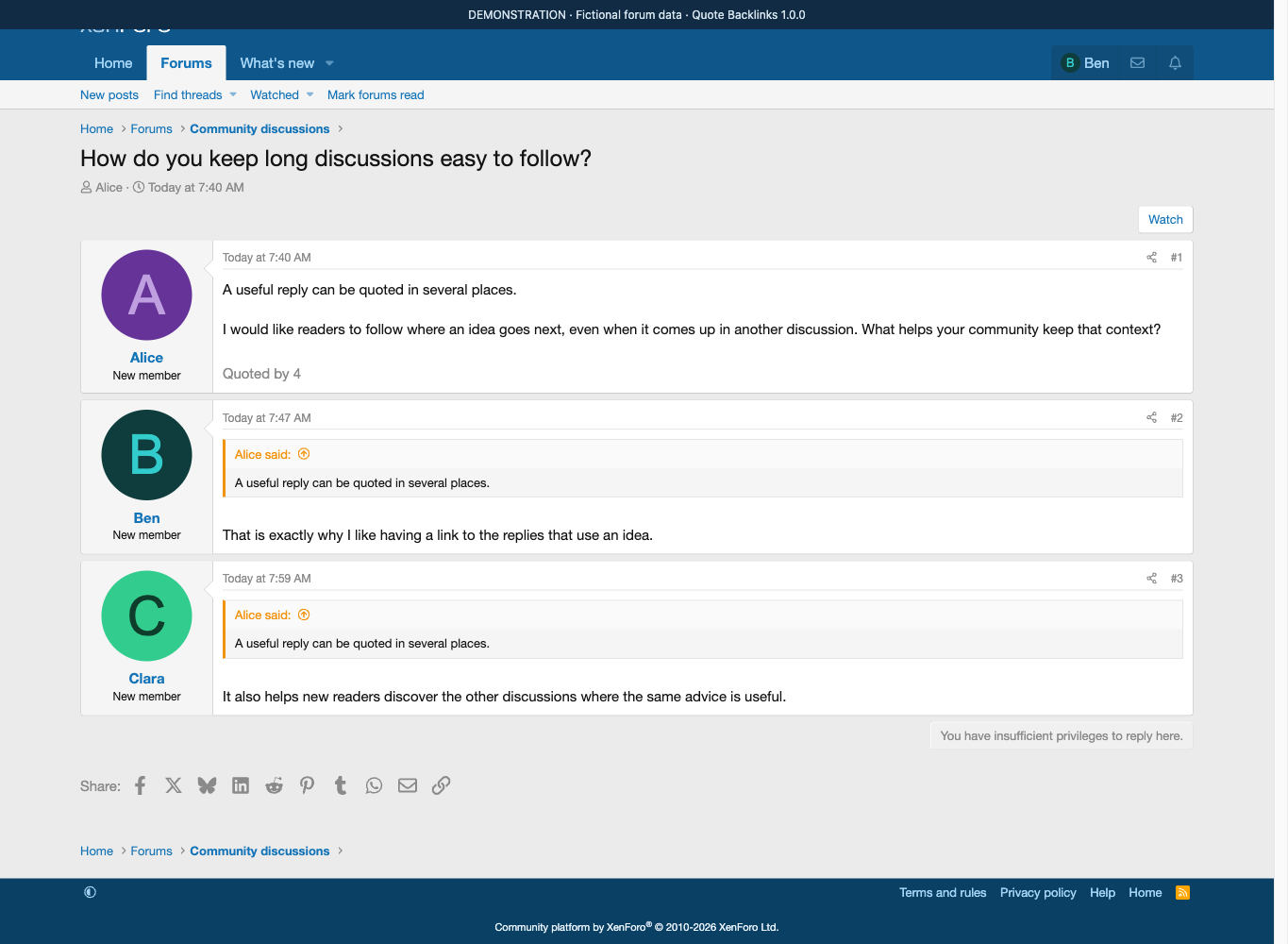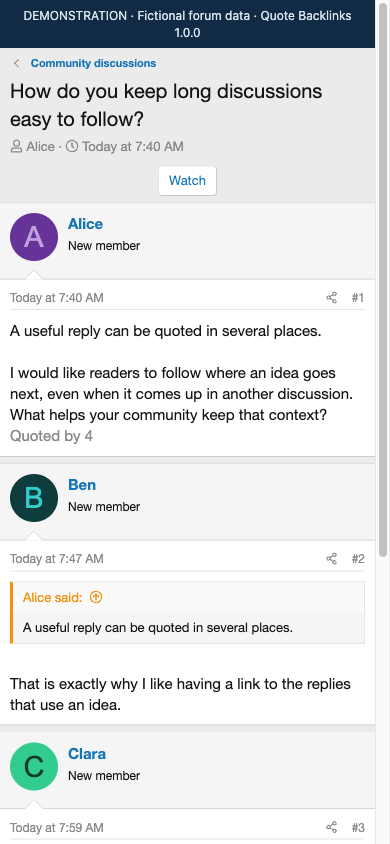
Follow the conversation beyond the original reply. Quote Backlinks adds a Quoted by {count} link below posts that have accessible quoting replies. Readers can see where an idea is referenced next, including in other threads.
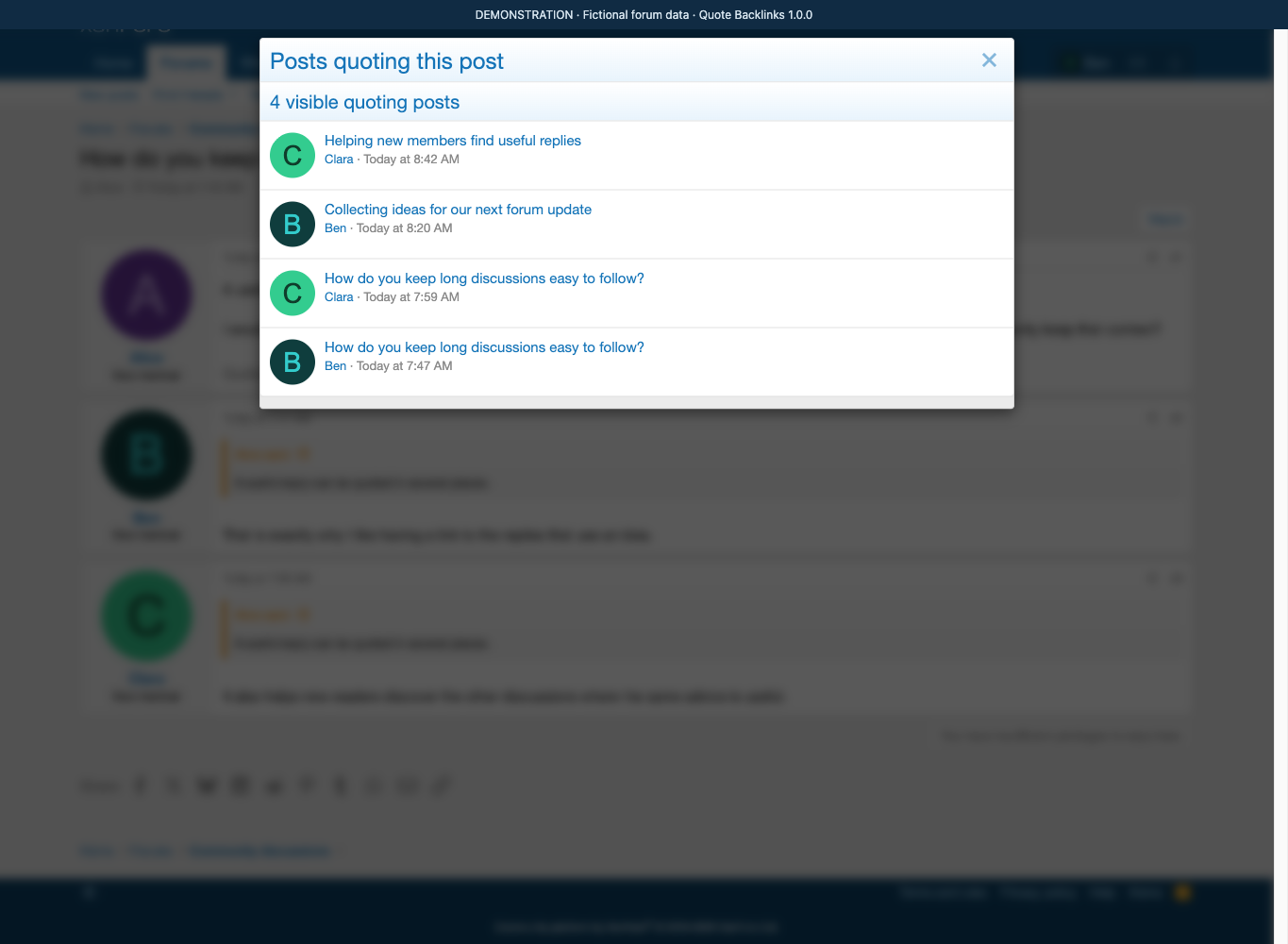
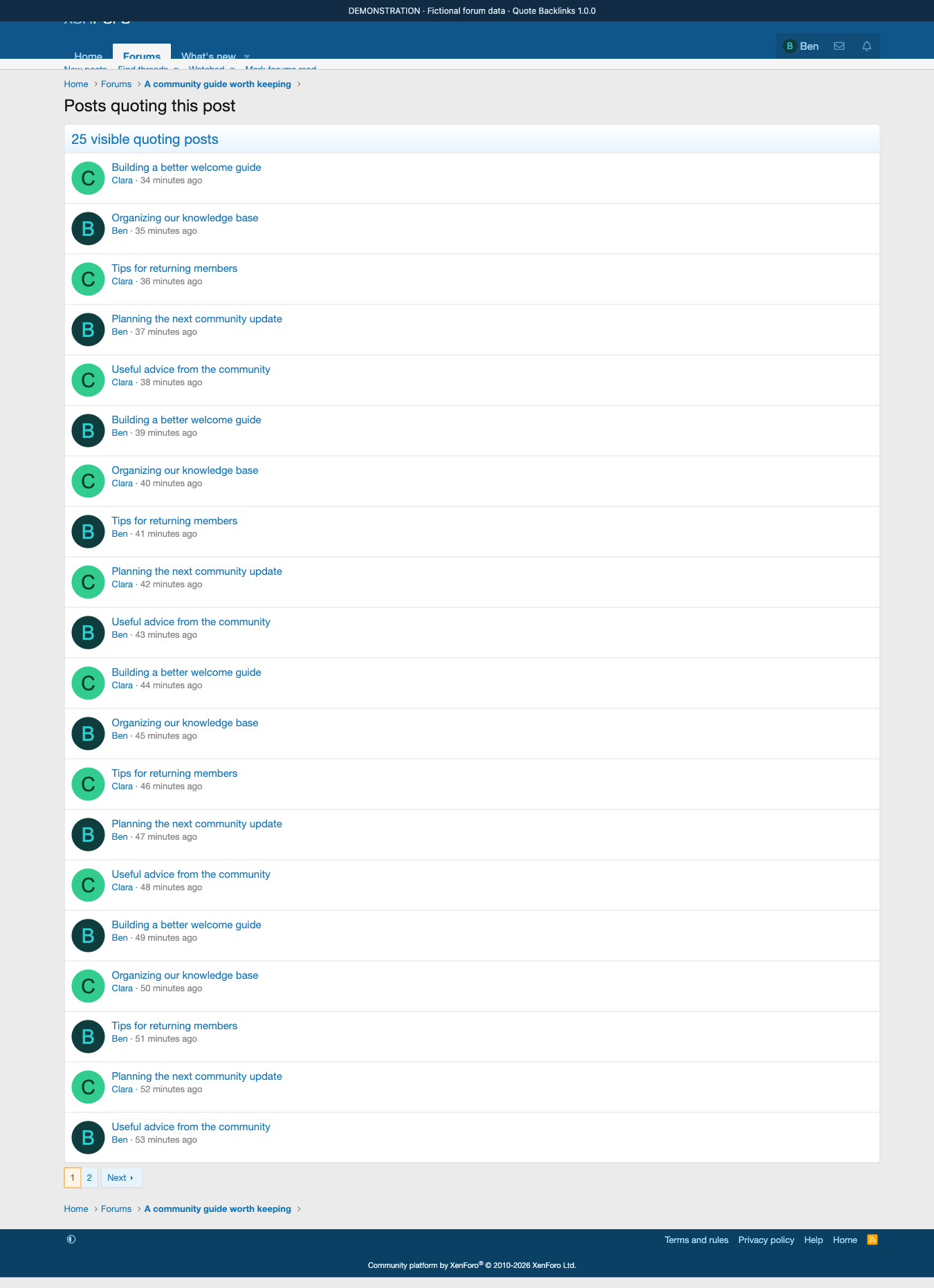
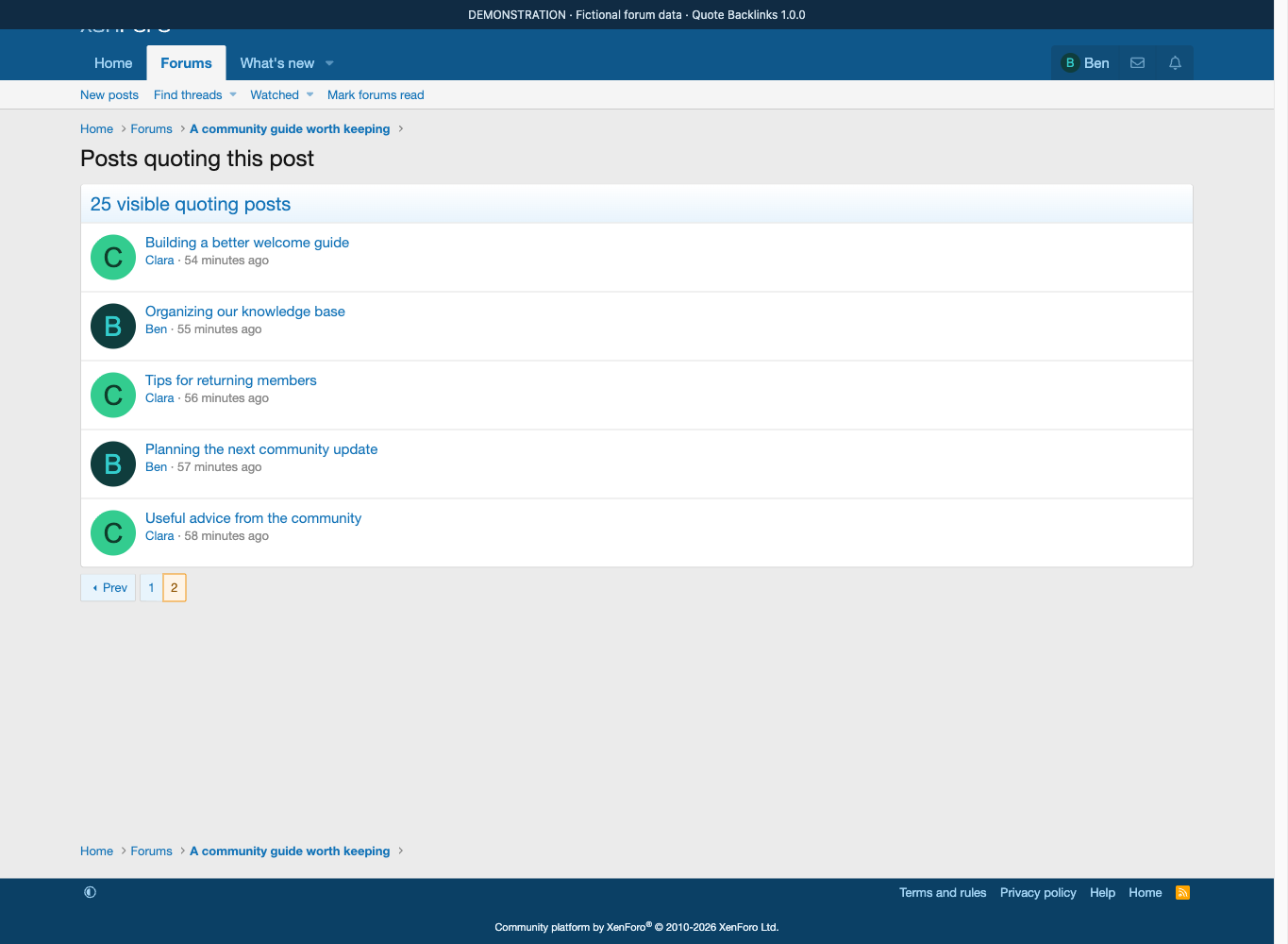
Open the replies in one place. Click the link to open a native XenForo popup with the quoting author, thread title, date and a direct link to each post. Results show the newest quoting posts first. Longer lists use 20 results per page, and the same list works as an ordinary page without JavaScript.
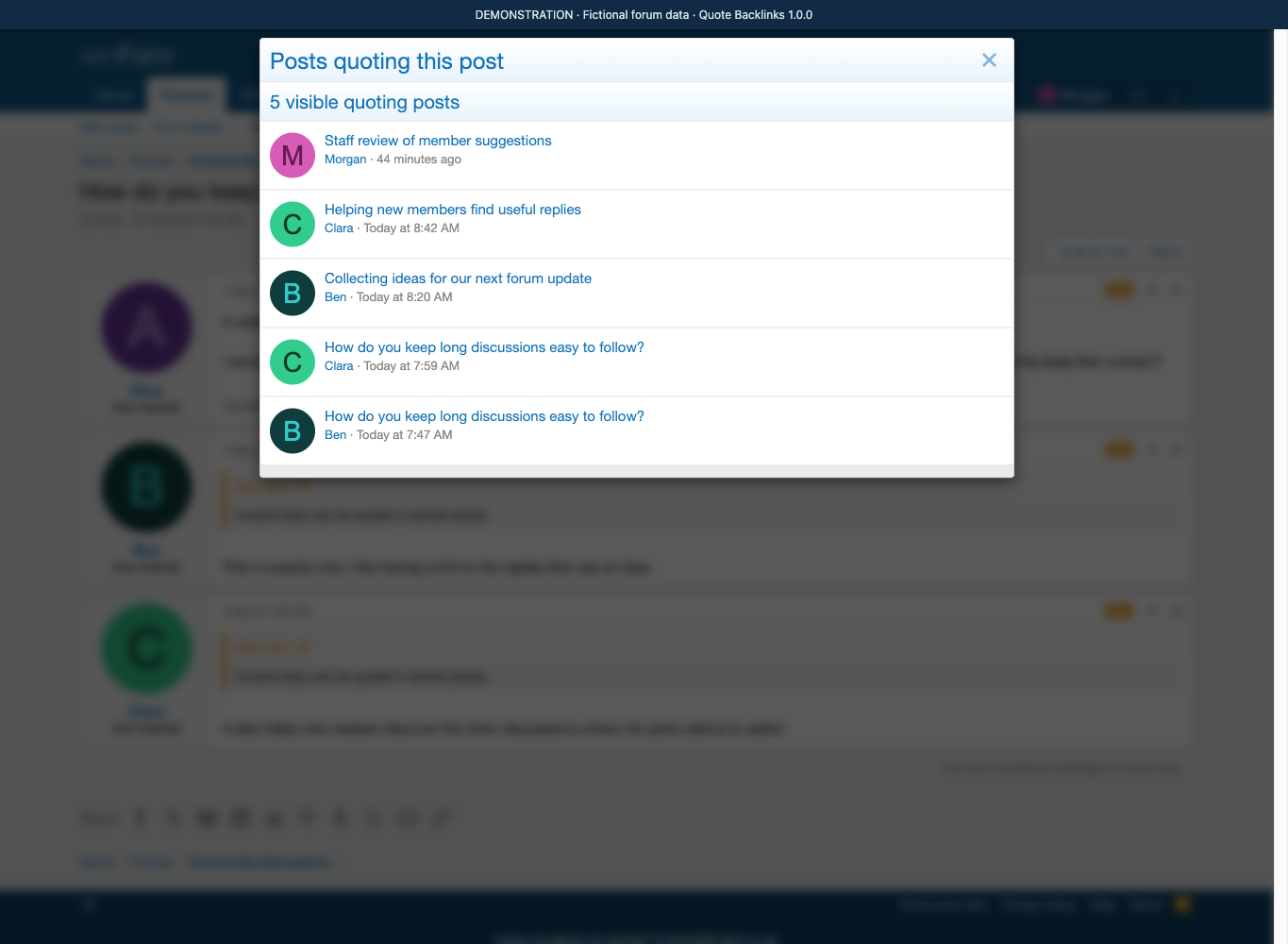
Keep private discussions private. Both the count and the list follow the current visitor's post-viewing permissions. A reference in a staff-only forum is included for authorized staff and excluded for a member who cannot read it. Moderated and deleted content follow XenForo's normal visibility rules.
Count replies, not repeated quote blocks. If one reply quotes the same original several times, it counts once. Quotes of your own earlier posts and references from other threads are supported. Username-only quotes and plain links do not create backlinks.
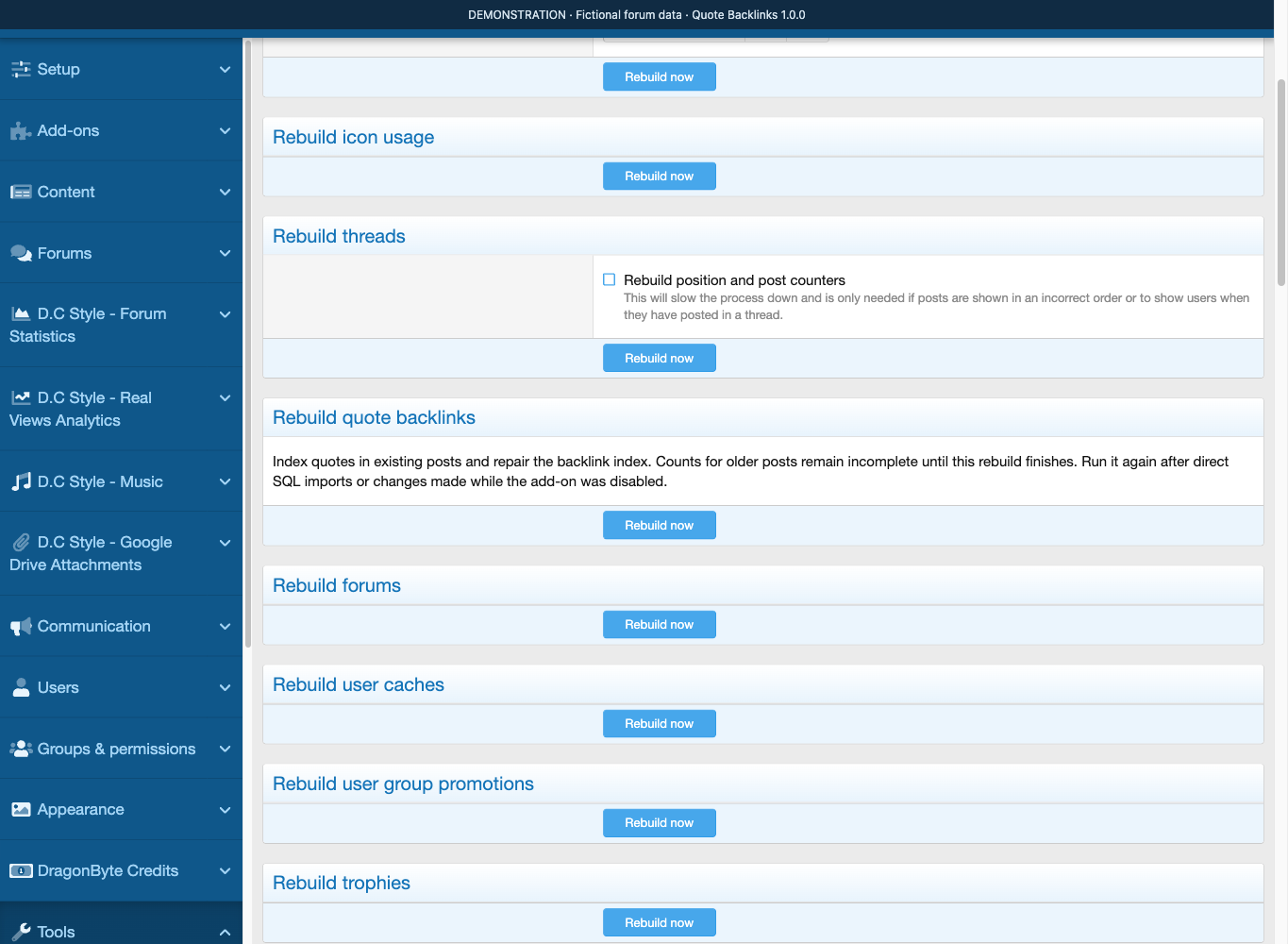
New and edited posts update automatically. Administrators can use Rebuild quote backlinks in the standard rebuild tools to index existing discussions. Run the rebuild once for historical posts and again after direct database imports or changes made while the add-on was disabled.
Features
Discover quoted replies
Show Quoted by {count} below a post when it has visible quoting replies.
Include quotes from the same thread and other threads.
Count each quoting post once, even when it quotes the same original repeatedly.
Recognize nested post quotes and quotes of a member's own earlier posts.
Leave posts without visible quoting replies free of an empty backlink row.
A native, useful list
Open a standard XenForo overlay with the author, avatar, thread title and date.
Jump directly to the quoting post.
List the newest quoting posts first, with 20 results per page.
Use a normal full-page list when JavaScript is unavailable.
Use translatable phrases and native forum styling on desktop and mobile.
Visibility that follows your forum
Filter both counts and results through the visitor's normal post-viewing permissions.
Respect private forums, own-thread restrictions, and permitted moderated/deleted content.
Reflect thread moves and permission changes on subsequent views without rebuilding the quote index.
Show only author, thread and date details; the list does not display message excerpts.
Automatic updates and historical indexing
Update relationships when posts are created or their messages are edited.
Remove obsolete links after quotes are removed, posts are merged, or posts/threads are permanently deleted.
Preserve relationships during soft deletion or moderation so permitted results can return after restoration.
Index older posts with Tools → Rebuild caches → Rebuild quote backlinks.
Use XenForo's resumable rebuild process without clearing the entire index first.
Installation
1. Check the platform and install
Review the Compatibility section and try the add-on with your forum style on a test installation. Install the supplied archive through Add-ons → Install/upgrade from archive. For a manual installation, copy the archive's upload contents into the XenForo root and install DC/QuoteBacklinks from the Add-ons page.
2. Index existing discussions
Open Tools → Rebuild caches → Rebuild quote backlinks and select Rebuild now. You need XenForo's normal administrator permission to rebuild caches. Let the standard job runner finish; it can resume interrupted work.
New post saves are indexed automatically. Counts for older content remain incomplete until the first historical rebuild finishes. The rebuild does not clear the complete index before starting.
3. Follow a quoted post
Open a thread containing a post quoted by an accessible reply. Select Quoted by {count}, review the quoting posts, then open a result to jump to that reply. Results may come from other threads.
No additional member permission needs to be enabled. The add-on uses your existing XenForo post-viewing rules. A visitor with no accessible quoting replies will see no backlink row.
4. Maintain the index
Run the rebuild again after direct database imports/edits or changes made while the add-on was disabled. Normal post creation, editing, merging and deletion are handled automatically.
Disabling the add-on preserves its index. Uninstalling removes the add-on's index and registration; it does not delete forum posts.
Compatibility
My forum runs
Release
Needs XenForo
Tested on
PHP
1.0.19 Oct 2026
2.2+
—
7.4+
1.0.03 Oct 2026
2.2+
—
7.4+
"Needs" is the oldest version a release installs on. Something not working on yours? Tell us.
It adds a Quoted by {count} link below posts that have quoting replies readers can see. Clicking it opens a standard XenForo overlay listing the quoting author, avatar, thread title and date, with a direct link to each post, newest first and 20 results per page. Quotes from the same thread and from other threads are included, and the list also works as a normal full page when JavaScript is unavailable.
Answered by D.C Style ·
Quote Backlinks needs XenForo 2.2 or later. The current release is version 1.0.0. As with any add-on, try it with your own forum style on a test installation before using it live.
Answered by D.C Style ·
Yes, for posts that already exist on your forum. Go to Tools, then Rebuild caches, then Rebuild quote backlinks and select Rebuild now; the standard job runner can resume if it is interrupted. New posts are indexed automatically, so counts for older content stay incomplete until the first rebuild finishes. Run the rebuild again after direct database imports or edits, or after changes made while the add-on was disabled.
Answered by D.C Style ·
No. Both the count and the result list follow the current visitor's normal post-viewing permissions, so a reference in a staff-only forum shows for authorized staff and is hidden from a member who cannot read it. Private forums, own-thread restrictions and permitted moderated or deleted content all respect XenForo's usual visibility rules. Thread moves and permission changes are reflected on subsequent views without rebuilding the index.
Answered by D.C Style ·
No. Each quoting post counts once, even when it quotes the same original reply repeatedly. Nested post quotes and quotes of your own earlier posts are recognized, while username-only quotes and plain links do not create backlinks at all.
Answered by D.C Style ·
What does Quote Backlinks actually add to my forum?
It adds a Quoted by {count} link below posts that have quoting replies readers can see.
Clicking it opens a standard XenForo overlay listing the quoting author, avatar, thread title and date, with a direct link to each post, newest first and 20 results per page. Quotes from the same thread and from other threads are included, and the list also works as a normal full page when JavaScript is unavailable.
Answered by D.C Style ·
Which XenForo versions does it work with?
Quote Backlinks needs XenForo 2.2 or later.
The current release is version 1.0.0. As with any add-on, try it with your own forum style on a test installation before using it live.
Answered by D.C Style ·
Do I need to run a rebuild after installing it?
Yes, for posts that already exist on your forum.
Go to Tools, then Rebuild caches, then Rebuild quote backlinks and select Rebuild now; the standard job runner can resume if it is interrupted. New posts are indexed automatically, so counts for older content stay incomplete until the first rebuild finishes. Run the rebuild again after direct database imports or edits, or after changes made while the add-on was disabled.
Answered by D.C Style ·
Will members see quotes from private or staff-only forums?
No.
Both the count and the result list follow the current visitor's normal post-viewing permissions, so a reference in a staff-only forum shows for authorized staff and is hidden from a member who cannot read it. Private forums, own-thread restrictions and permitted moderated or deleted content all respect XenForo's usual visibility rules. Thread moves and permission changes are reflected on subsequent views without rebuilding the index.
Answered by D.C Style ·
Does a reply count more than once if it quotes the same post several times?
No.
Each quoting post counts once, even when it quotes the same original reply repeatedly. Nested post quotes and quotes of your own earlier posts are recognized, while username-only quotes and plain links do not create backlinks at all.